Extend MediaMonkey's management abilities.
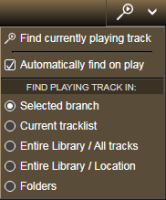
It allows finding and displaying of the folder that contains the currently playing track within the selected branch of the Media Tree automatically whenever the program starts to play another track. After the containing folder is located, the currently playing track will be selected in the main tracklist.
There is no direct download, the add-on will be send by e-mail after received donation. The free version for MM4 is available for download at its web site.
By
Zvezdan Dimitrijević
Submitted by ZvezdanD
Updated 20/06/2022
Version History / Details
- Version:
- 2.0
- Updated:
- 20/06/2022
- Works with:
- Media Monkey 5
- Changes:
Added: version of the add-on for MediaMonkey v5.
This addon highlights low-bitrate files in file listings.
By
Ventis Media, Inc
Submitted by drakinite
Updated 08/12/2020
Version History / Details
- Version:
- 1.0
- Updated:
- 08/12/2020
- Size:
- 1.25 KB
- Works with:
- Media Monkey 5.0.0 - 5.0.0
Depending on your source - you may have hundreds of files in an audiobook from several CDs.
Each CD its own track numbers, which means you may end up with several identically named tracks in the entire album.
A nightmare for some audio players to gifure out the correct order.
Track Entitler merely offers the possiblilty to automatically name the tracks based on the track number.
Process
- Make sure all files have Track Numbers in correct, sequential order.
- Select all tracks you want re-entitled.
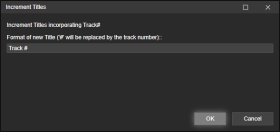
- Right-click Edit Tags (or use the Tools > Edit Tags), and select Increment Titles.
- Add the text that you want your newly entitled tracks to have.
The character # will be replaced by the track number.
Examples
Track #
Track 1
Track 2
Track 3
...
New Moon # of 102
New Moon 1 of 102
New Moon 2 of 102
New Moon 3 of 102
...
By
ConcernedWife
Submitted by ConcernedWife
Updated 08/10/2025
Version History / Details
- Version:
- 1.0.2
- Updated:
- 08/10/2025
- Size:
- 2.41 KB
- Works with:
- Media Monkey 5 - 5
- Changes:
Initial version