Latest Addons
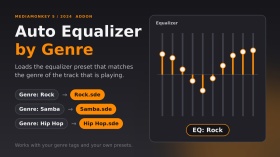
Automatically loads an equalizer preset when the track changes, based on the track’s genre. The preset must be a file named exactly like the genre inside the Equalizer folder (e.g. genre “Rock” → EqualizerRock.sde). Genres without a preset keep your current equalizer settings. Multiple genres (“Rock; Pop”) are supported: the first one with a preset file is used. A short “EQ: Rock” message shows when the preset changes.
Tested on MediaMonkey 2024.2.2.3222 (Windows). Inspired by the 2006 script AutoEQ.vbs by DiddeLeeDoo; this addon is original code written from scratch for MediaMonkey 5.
Em português: carrega automaticamente o preset do equalizador conforme o gênero da faixa. O arquivo do preset deve ter o mesmo nome do gênero, dentro da pasta Equalizer.
By
Fernando Santos & Claude
Submitted by FernandoSantos
Updated 14/10/2026
Version History / Details
- Version:
- 1.1
- Updated:
- 14/10/2026
- Size:
- 2.99 KB
- License:
- MIT (permite usar e modificar, mantendo os crédito
- Works with:
- Media Monkey 2024.2
- Changes:
Version 1.1.0 - first public release.
- Automatically loads the equalizer preset that matches the track's genre (Equalizer<Genre>.sde).
- Finds the Equalizer folder on its own (no fixed paths).
- Genres without a preset keep your current EQ (the file is checked first, because loading a missing preset resets the EQ to flat).
- Multiple genres (Rock; Pop) supported: the first one with a preset is used.
- Short "EQ: <preset>" message that disappears on its own.
Tested only on MediaMonkey 2024.2.2.3222 (Windows).Versão 1.1.0 - primeira versão pública.
- Carrega automaticamente o preset do equalizador correspondente ao gênero da faixa (Equalizer<Gênero>.sde).
- Encontra a pasta Equalizer sozinho (sem caminhos fixos).
- Gêneros sem preset mantêm o seu EQ atual (o arquivo é verificado antes, pois carregar um preset inexistente zera o EQ).
- Vários gêneros (Rock; Pop): usa o primeiro que tiver preset.
- Aviso rápido "EQ: <preset>" que some sozinho.
Testado apenas no MediaMonkey 2024.2.2.3222 (Windows).
Album Rating Node adds an "Album Rating" sub-node to your collections. It groups the albums of a collection by their album rating (5 stars down to 0.5 stars, bomb and Unknown), so you can browse your best and worst rated albums at a glance, similar to the existing Rating node for tracks, but based on albums.
IMPORTANT: Enabling the node requires a MediaMonkey Gold license. The sub-node is switched on in the collection settings, and editing or creating collections is a Gold feature (the free version shows the Gold registration dialog instead).
By
AI (inspired by Fetzenschaedl)
Submitted by fetzenschaedl
Updated 11/10/2026
Version History / Details
- Version:
- 0.1
- Updated:
- 11/10/2026
- Size:
- 19.83 KB
- Works with:
- Media Monkey 2024 - 2027
Cover Browser replaces MediaMonkey default single-cover preview with an extended viewer that allows users to cycle through and inspect all embedded covers (front, back, booklet pages, discs, etc.) for a track or album.
Key Features
-
Multi-Cover Navigation: Flip through all covers using arrow keys, on-screen buttons, or the mouse wheel (with optional wrap-around).
-
Detailed Info Bar: Displays cover counter position, cover type, pixel/file size, and storage location.
-
Image Controls:
-
Rotate: 90° rotation (ideal for scanned booklet pages).
-
Zoom & Pan: 25% to 400% zoom with click-and-drag panning.
-
Fit Window to Image: Resizes and repositions the window to match the cover's aspect ratio without crossing taskbar boundaries.
-
-
PDF Booklet Support: Displays embedded PDF booklets directly within the viewer.
-
Auto-Hiding UI: Toolbar automatically fades out during mouse inactivity.
-
Safe Fallback: Operates like the default view if only one cover is present or if loading fails.
Known Limitations
-
Album View Scope: For albums, only covers belonging to the first track are displayed.
-
PDF Restrictions: PDF booklets cannot use the add-on's custom rotate, zoom, or window-fitting tools (uses built-in PDF viewer tools instead). Support for PDF artwork also depends on the MediaMonkey version.
-
Zoom Rotation Alignment: 90°/270° rotation while zoomed in may appear slightly off-center.
By
AI (Inspired by Fetznschaedl)
Submitted by fetzenschaedl
Updated 06/10/2026
Version History / Details
- Version:
- 0.5.1
- Updated:
- 06/10/2026
- Size:
- 59.81 KB
- Works with:
- Media Monkey 2024 - 2027
- Changes:
What's New in 0.5.1
-
Automatic Window Fitting & Centering: Dynamically resizes the window to match cover dimensions while browsing, with flexible options to center the window relative to your monitor or keep its previous position, optimized for multi-monitor setups with seamless, flicker-free image loading.
-
Background Duplicate Detection: Automatically filters out duplicate covers (e.g., matching embedded tag images and folder files) in the background without freezing the UI or delaying image displays.
-
Enhanced Folder Scanning & UI Feedback: Better handling of large image folders with configurable display limits, validated settings, and clear status indicators (such as ... and +) to show when background scanning is underway.
-
- Version:
- 0.2
- Updated:
- 29/09/2026
- Size:
- 36.64 KB
- Works with:
- Media Monkey 2024 - 2027
- Changes:
Version 0.2.0
-
Folder Files Integration: Automatically appends images and optionally PDFs from the track's folder, subfolders, and parent folder to the cover list for browsing (requires MediaMonkey 5.0.4+). Adds configurable options for inclusion and depth/file limits.
-
Duplicate Prevention: Skips folder files that duplicate existing tag covers based on file path and storage details.
-
UI & Display Enhancements: The info bar now displays Folder, pixel dimensions, file size, and relative path. Works fully even when showing a folder file without tagged covers.
Version 0.1.3
-
Reworked Zoom System: Changed zoom percentages to reflect original pixel dimensions (100% = actual size) using fixed levels (10% to 800%). Smooth transitions from "Fit" mode without sudden jumps.
-
Center Anchor & Quality: Zooming now retains the current view's center point, and maximum source resolution was increased to 5000 px for crisp viewing of high-res covers.
-
New Shortcut: Added shortcut key 1 to jump directly to actual size (100%).
-
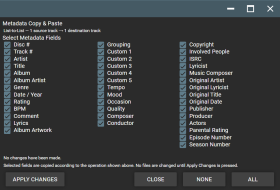
Metadata Copy & Paste brings flexible metadata copying and pasting to MediaMonkey 5 Mobile.
Copy selected metadata from one or more source tracks and paste it to one or more destination tracks using four transfer modes:
• One-to-One
• List-to-List
• One-to-Many
• Many-to-One
The detailed field-selection screen lets you choose exactly which metadata fields to transfer, including Artist, Title, Album, Album Artist, Genre, Date/Year, Rating, BPM, Comment, Lyrics, Composer, Conductor, Publisher, Producer, custom fields, and other supported track metadata.
Album Artwork can also be selected for transfer, either together with metadata or independently.
The addon is designed to provide functionality similar to the Copy Metadata / Paste Metadata features found in MediaMonkey 4's Advanced Duplicate Find & Fix, adapted for MediaMonkey 5 Mobile.
By
Project 37
Submitted by Project37
Updated 21/09/2026
Version History / Details
- Version:
- 3.3.3
- Updated:
- 21/09/2026
- Size:
- 4.68 KB
- License:
- None
- Works with:
- Media Monkey V2024.2.2 - V2024.2.2.3222
- Changes:
Version 3.3.3
Right click on a file and scroll down to "Edit tags" and then the popup screen will list "Copy Metadata" & "Paste Metadata" options.
• Added Album Artwork as a selectable transfer option.
• Album Artwork can be copied together with selected metadata or transferred independently.
• Album Artwork works with One-to-One, List-to-List, One-to-Many, and Many-to-One operations.
• Added support for transferring artwork across multiple source and destination tracks.
• Preserved the detailed metadata field-selection interface and existing transfer functionality.
• Tested on MediaMonkey 5 Mobile.

Announces the playing track title and artist via text-to-speech and large text overlay. This pet project was created as a means of learning the names of my DJ tracks as I listen to them so I can go back to them more readily when I am making a DJ set.
By
MicroRaveNZ
Submitted by MicroRaveNZ
Updated 21/09/2026
Version History / Details
- Version:
- 1.0.8
- Updated:
- 21/09/2026
- Size:
- 6.75 KB
- Works with:
- Media Monkey 5.0
- Changes:
Announces the playing track title and artist via text-to-speech and large text overlay. This pet project was created as a means of learning the names of my DJ tracks as I listen to them so I can go back to them more readily when I am making a DJ set.